NSE7_FSN_AR-7.6 Exam Questions & Answers
Fortinet NSE 7 - Secure Networking 7.6 Architect • Fortinet
Sample NSE7_FSN_AR-7.6 Questions
Practice with real exam-style questions, each with the verified correct answer and explanation.
Refer to the exhibit.
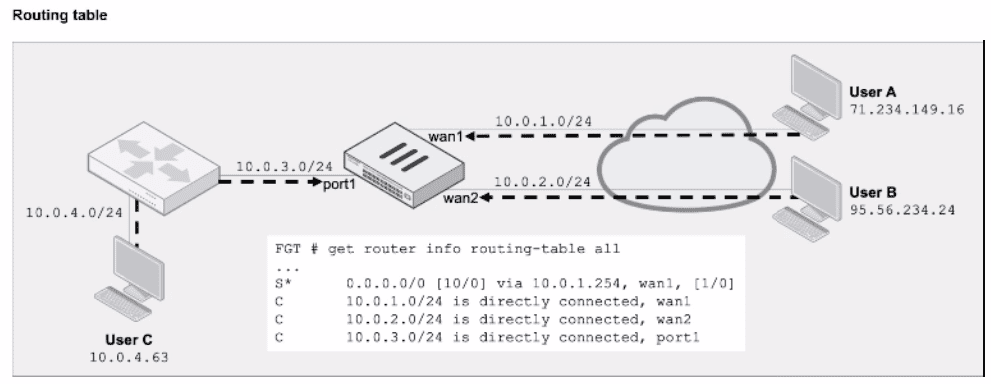
The routing table information is shown.
Assuming a default configuration, which three statements about the RPF check on FortiGate are
correct? (Choose three.)
The correct answers are A, D, and E. This is a feasible path RPF check scenario. In FortiGate's default RPF behavior, FortiGate checks whether the routing table contains a valid return route to the source IP address through the same interface on which the packet arrived. The study guide's RPF feasible path example states that FortiGate ''checks the routing table for a route that matches the source address and incoming interface of the first original packet.'' It then gives the exact result: User A passes because ''there is a default route through wan1,'' so packets received on wan1 pass the RPF check regardless of source address. User B fails because FortiGate does not have a route to 95.56.234.24 through wan2. User C fails because FortiGate does not have a route to 10.0.4.63 through port1. Therefore, option B is wrong because FortiGate is not allowing asymmetric return routing here. Option C is wrong because the default route points out wan1, not port1, so it cannot validate User C's packet arriving on port1.
Refer to the exhibit.
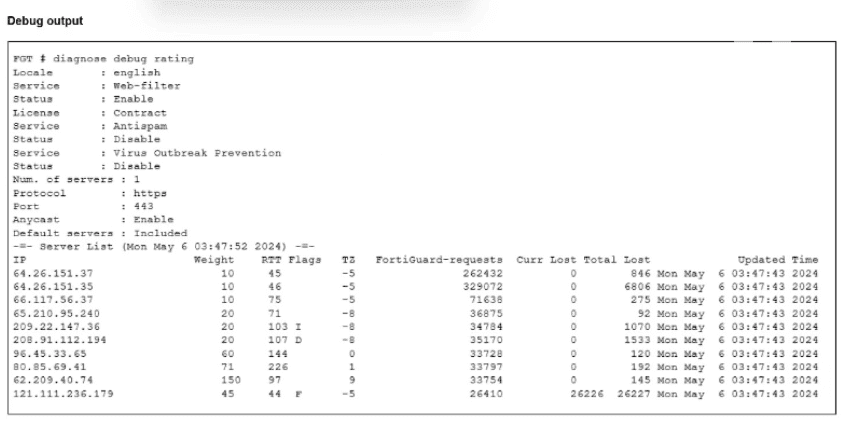
The administrator did not override the FortiGuard FODN or IP address in the FortiGate configuration
Which IP address did FortiGate get when resolving the servicem,fortiguard.net name?
The study guide explicitly explains the FortiGuard flags shown by diagnose debug rating:
D = Default
''IP addresses of servers received from DNS resolution''
It then clarifies even more specifically:
''D = The IP address FortiGate got when resolving the service.fortiguard.net name (usually two or three servers have this flag, if the administrator didn't overwrite the FortiGuard FQDN or IP address in the FortiGate configuration)''
In the exhibit, among the answer choices, the IP address marked with the D flag is 208.91.112.194. Therefore, that is the IP FortiGate got from resolving service.fortiguard.net.
Why the other options are wrong:
B . 209.22.147.36 is not the correct choice because in the exhibit it is not the DNS-resolution entry identified by the D flag
C . 64.26.151.37 has no D flag
D . 96.45.33.65 has no D flag
So the verified answer is: A.
Refer to the exhibit, which shows the partial output of a diagnose command.
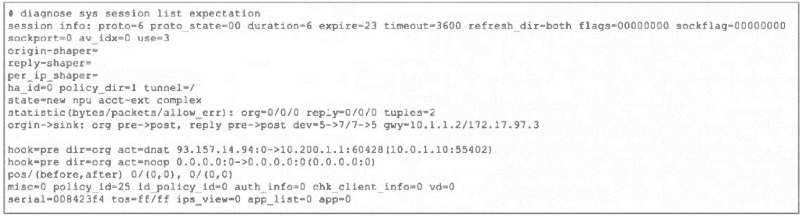
Which two conclusions can you draw from the output shown in the exhibit? (Choose two.)
The study guide identifies this exact output as an expectation session created by the FTP session helper:
''run helper-ftp'' indicates the FTP helper is in use.
''FortiGate created an expectation session and opened the pinhole port for the expected return traffic''
It also explains why this exists:
''Another important function of the session helper is to temporarily create an expected session (or pinhole) for the data channel connection that comes from the server.''
''The session helper automatically creates the session and opens the door for the incoming connection.''
''These incoming TCP sessions use random TCP port numbers.''
That directly proves C is correct.
For A, the exhibit shows expire=23. The study guide explains the expire field as the length of time until the session expires if no matching traffic arrives, and the FortiOS guide states for expectation sessions:
''Expectation sessions usually have a timeout value of 30 seconds. If the communication from the server is not initiated within 30 seconds the expectation session times out and traffic will be denied.''
So with expire=23, FortiGate will allow that expected traffic only for the remaining 23 seconds; after that, it times out and the traffic is denied. That makes A correct.
Why the other options are wrong:
B is not supported. The study guide describes expectation sessions as being created by the session helper from the control-session negotiation, not as independent objects unaffected by the master session.
D is wrong as stated. Even though the output contains policy_id=25, the study guide explicitly says the incoming expected connection is allowed by the expected session itself, ''even when no firewall policy allows it.''
Refer to the exhibit.
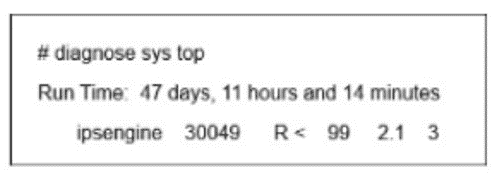
FortiGate is showing continuous high CPU usage During a maintenance window, the CLI command diagnose sys top displays the output shown in the exhibit. The CLI command diagnose twat application ipsmonitor 5 was run. but the CPU usage by daemon ipsengine did not drop Which immediate action can you take to reduce the CPU usage effectively?
To solve this high CPU usage scenario involving the ipsengine, we must understand the specific functions of the diagnose test application ipsmonitor commands shown in the troubleshooting steps.
Analyze the Situation:
Exhibit: The diagnose sys top output shows the ipsengine process is in a run state (R) consuming 99% CPU.
Previous Action: The administrator already ran diagnose test application ipsmonitor 5.
Result: The CPU usage did not drop.
Understand the Commands:
diagnose test application ipsmonitor 5: This command toggles IPS Bypass Mode. When enabled, the IPS engine lets traffic pass through without inspection.
Implication: If the CPU was high due to traffic volume, enabling bypass would drop the CPU load immediately.
Failure: Since the CPU remained at 99% after bypass, the ipsengine process is likely frozen, stuck, or in an internal infinite loop unrelated to the current traffic flow. The process itself is the problem, not the traffic volume.
Evaluate the Solution (Option B):
diagnose test application ipsmonitor 2: This command toggles the IPS engine's Enable/Disable status.
Because the engine is stuck (bypass failed to relieve pressure), the 'Immediate action' required is to stop or restart the process entirely.
Running option 2 effectively disables/kills the stuck IPS engine instance, which will immediately drop the CPU usage to near zero. (It can then be toggled again to restart it).
Why other options are incorrect:
A (Reduce signatures): This is a tuning measure for normal operation, not an immediate fix for a stuck process at 99% CPU.
C (Disable IPS on policies): This is a configuration change that takes time and requires a commit; it is not the most immediate diagnostic tool available.
D (Bypass all IPS engines): This describes the action of command 5 (Bypass), which the prompt explicitly states was already performed and failed.
FortiGate Security 7.6 Study Guide (IPS & Diagnostics): 'Troubleshooting IPS high CPU: 1. Check top. 2. Try bypass (ipsmonitor 5). 3. If CPU persists, restart the engine (ipsmonitor 99 or 2).'
Exhibit.

Refer to the exhibit, which shows two entries that were generated in the FSSO collector agent logs.eeeeeeeeeeeeeeeeeeeeeeeeeeeeeeeeeeeeeeeeeeeeeeeeeeeeeeeeeeeeeeeeeeeeeee
What three conclusions can you draw from these log entries? {Choose three.)
Get access to all 146 verified questions with detailed answers in our NSE7_FSN_AR-7.6 exam dumps.
Unlock All NSE7_FSN_AR-7.6 Questions