NSE5_FWB_AD-8.0 Exam Questions & Answers
Fortinet NSE 5 - FortiWeb 8.0 Administrator • Fortinet
100% money-back guarantee
Sample NSE5_FWB_AD-8.0 Questions
Practice with real exam-style questions, each with the verified correct answer and explanation.
Refer to the exhibit.
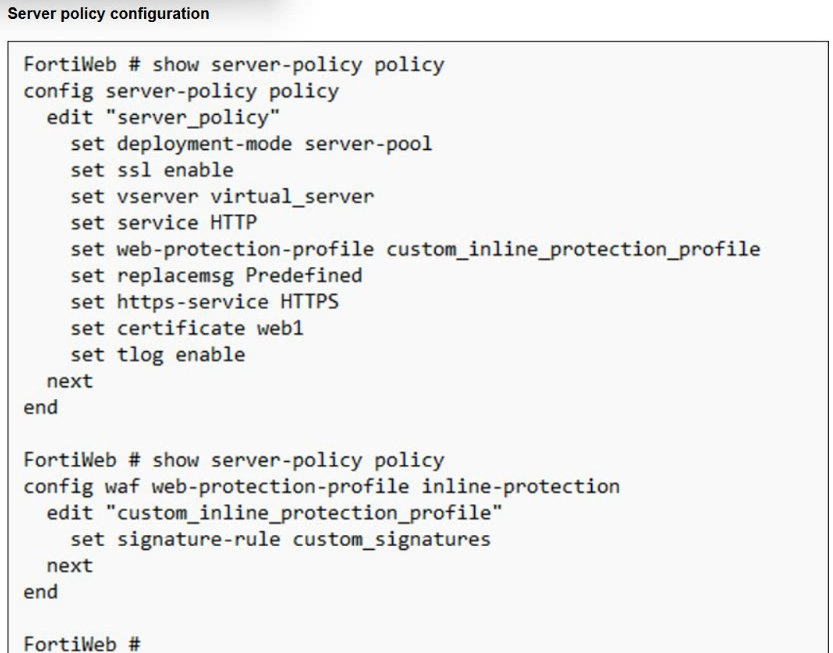
You have deployed FortiWeb behind a FortiGate that is configured as a reverse proxy and inserts the X-Forwarded-For HTTP header when forwarding HTTP and HTTPS traffic.
FortiWeb is using a custom inline protection profile, and logging is enabled, as shown in the exhibit.
You notice that FortiWeb is blocking legitimate users, and all requests in the attack logs appear to come from the FortiGate IP address, not the original client IP address.
Which action should you take to fix this issue?
The FortiGate is acting as an upstream reverse proxy, so FortiWeb sees the FortiGate address as the direct source IP unless it is configured to read the original client IP from the inserted HTTP header. Since FortiGate already inserts X-Forwarded-For, the proper fix is to modify the FortiWeb protection profile or related client-IP configuration so FortiWeb uses that header for client IP detection. This restores accurate logging, rate limiting, reputation checks, and IP-based enforcement. Changing to one-arm proxy is unnecessary and disruptive. Disabling IP-based detection weakens protection instead of fixing attribution. Recreating the policy with a predefined profile does not address the missing client IP mapping. The correct adjustment is to trust and use X-Forwarded-For.
Refer to the exhibits.
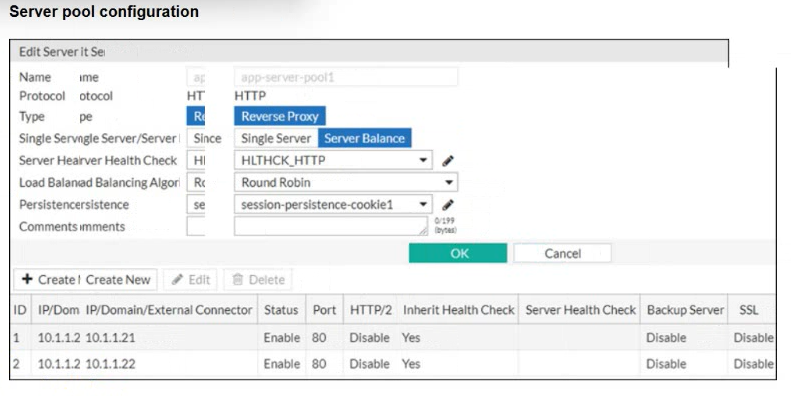
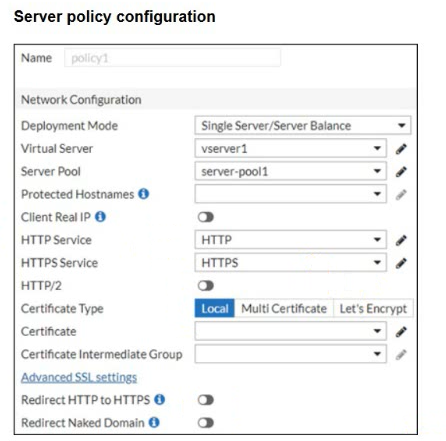
You are configuring a FortiWeb device in reverse proxy mode, placed downstream from a FortiGate. The server pool includes two back-end web servers: 10.1.1.21 and 10.1.1.22, and you've defined a health check policy.
After completing the server policy configuration and applying it to a virtual server, you notice that FortiWeb is not forwarding traffic to the back-end servers. No errors or health check failures appear in the logs.
Based on the configuration shown in the exhibit, which change should you make to restore back-end traffic flow?
The exhibits show a mismatch between the configured server pool and the server pool referenced by the server policy. The server pool containing the two back-end servers is named app-server-pool1, but the server policy is selecting server-pool1. In reverse proxy mode, FortiWeb receives traffic on the virtual server and then forwards it to the server pool selected in the server policy. If the policy points to the wrong or empty pool, traffic will not be forwarded to the intended back-end servers, even if health checks for the correct pool are healthy. Client Real IP affects source IP preservation, not pool selection. The FortiGate should forward traffic to FortiWeb, not directly bypass it. The correct fix is to select the correct server pool.
Refer to the exhibits.
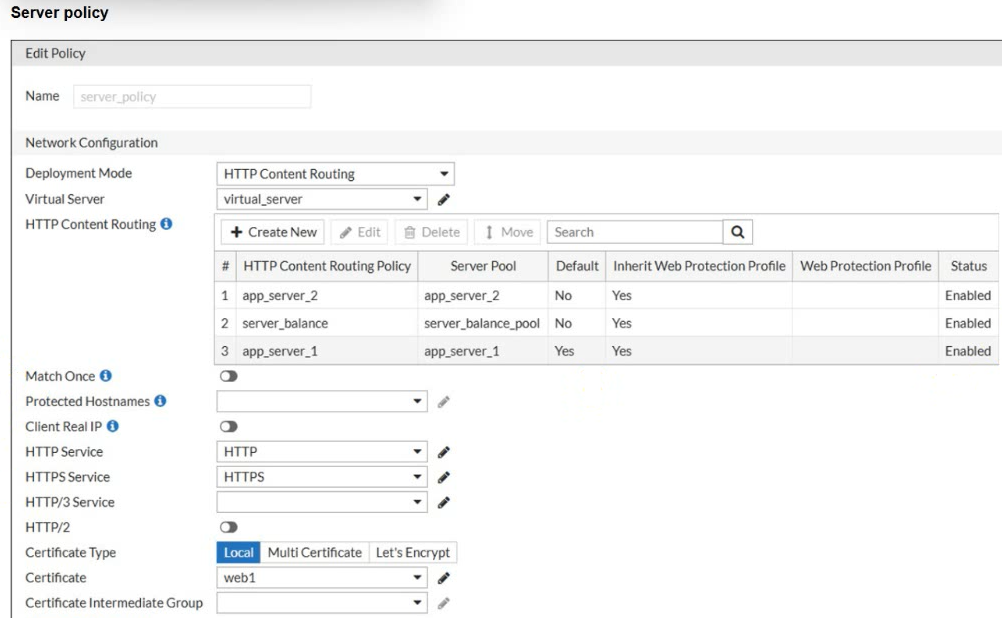
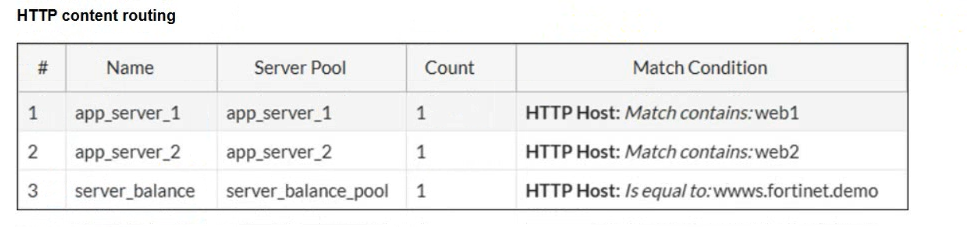
A new domain, https://finance.fortinet.demo, was added but not explicitly mapped. Users report the site loads correctly, but you're unsure which back-end server is being used.
Why is this request succeeding despite no explicit routing rule for finance.fortinet.demo?
The exhibit shows FortiWeb using HTTP content routing, with multiple routing policies and one policy marked as the default. The domain finance.fortinet.demo does not match the explicit routing rules shown, so FortiWeb falls back to the default HTTP content routing entry. In the policy table, app_server_1 is marked as the default route, meaning unmatched requests are sent to that server pool. The certificate does not determine back-end routing; it only supports TLS identity. FortiWeb does not automatically create routing policies for new domains, and the request is not passed to FortiGate for secondary content routing. Because no explicit hostname match exists, the default content routing policy handles the request.
How should a FortiWeb administrator configure behavior-based bot detection to identify traffic from nonhuman users?
FortiWeb bot mitigation is designed to distinguish automated clients from real human users by evaluating request behavior and browser interaction signals. Request-rate limits help detect automation patterns such as excessive requests over a short period, while mouse movement tracking is a behavioral or biometric-style control that helps confirm whether a browser session is being operated by a human. Blocking all unknown devices is too aggressive and would create major false positives. Disabling JavaScript for anonymous users would actually weaken behavior collection because FortiWeb uses JavaScript-based techniques in some bot workflows. Login-failure IP blocklists help against credential attacks, but they do not broadly identify nonhuman users. Therefore, request limits plus mouse movement tracking is the best answer.
Refer to the exhibit.
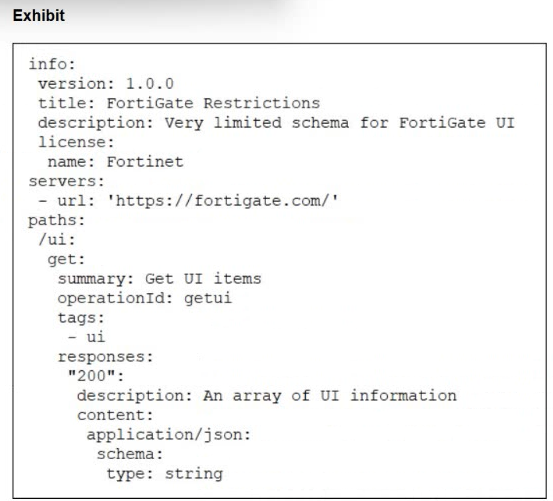
What does the exhibit show?
The exhibit is written in structured OpenAPI/YAML-style format. It includes fields such as info, version, title, servers, paths, HTTP method get, operationId, responses, content type application/json, and a schema definition. That is not HTML and it is not a live API response. It is also not CLI output from FortiWeb. FortiWeb OpenAPI validation uses OpenAPI description files in YAML or JSON to define API structure, endpoints, parameters, and expected data types. FortiWeb then uses that uploaded schema as a baseline to validate API requests and block requests that do not conform. So the exhibit is best identified as an API schema file
Get access to all 36 verified questions with detailed answers.
Unlock All NSE5_FWB_AD-8.0 Questions