FCP_FCT_AD-7.4 Exam Questions & Answers
Fortinet NSE 6 - FortiClient EMS 7.4 Administrator • Fortinet
100% money-back guarantee
Sample FCP_FCT_AD-7.4 Questions
Practice with real exam-style questions, each with the verified correct answer and explanation.
Refer to the exhibits.
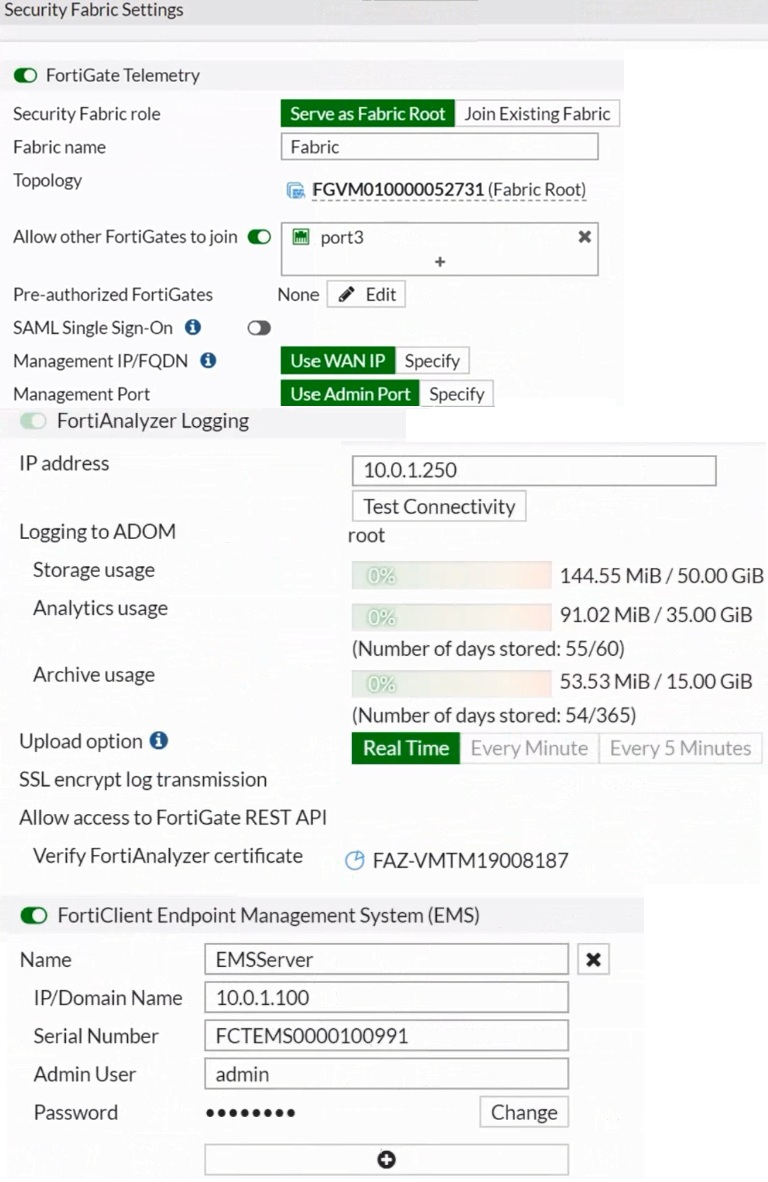
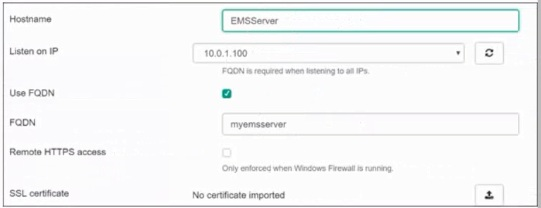
Based on the FortiGate Security Fabric settings shown in the exhibits, what must an administrator do on the EMS server to successfully quarantine an endpoint. when it is detected as a compromised host (loC)?
Based on the FortiGate Security Fabric settings shown in the exhibits, to successfully quarantine an endpoint when it is detected as a compromised host (IOC), the following step is required:
Enable Remote HTTPS Access to EMS: This setting allows FortiGate to communicate securely with FortiClient EMS over HTTPS. Remote HTTPS access is essential for the quarantine functionality to operate correctly, enabling the EMS server to receive and act upon the quarantine commands from FortiGate.
Therefore, the administrator must enable remote HTTPS access to EMS to allow the quarantine process to function properly.
Reference
FortiGate Infrastructure 7.2 Study Guide, Security Fabric and Integration with EMS Sections
Fortinet Documentation on Enabling Remote HTTPS Access to FortiClient EMS
Which security attribute is verified during the SSL connection negotiation between FortiClient and FortiClient EMS to mitigate man-in-the-middle (MITM) attacks? (Choose one answer)
According to the FortiClient EMS Administrator Study Guide (7.2/7.4 versions) and the Fortinet Document Library regarding SSL/TLS Endpoint Communication Security, the primary attribute verified during the SSL connection negotiation to mitigate Man-in-the-Middle (MITM) attacks is the Common Name (CN).
1. SSL Connection Negotiation & MITM Mitigation
Verification Process: When FortiClient attempts to establish a Telemetry connection with the FortiClient EMS server, an SSL handshake occurs. To ensure it is communicating with the legitimate server and not a malicious interceptor (MITM), FortiClient verifies the server's certificate.
Role of the Common Name (CN): The Common Name (or the Subject Alternative Name - SAN) in the certificate must match the FQDN (Fully Qualified Domain Name) or the IP address that the client intended to connect to.
Security Enforcement: If the CN/SAN does not match the server's expected address, FortiClient will detect a discrepancy. Depending on the Invalid Certificate Action setting in the profile (e.g., Warn or Block), it will prevent the establishment of a secure session to stop the MITM attacker from masquerading as the EMS server.
2. Why Other Options are Incorrect/Secondary
A . Serial Number (SN): While every certificate has a unique Serial Number, it is primarily used by the Certificate Authority (CA) for tracking and revocation purposes. While FortiOS 7.2.4+ can use SN for certain restricted VPN checks, the core SSL negotiation mechanism for identifying a specific host to prevent spoofing relies on the CN/SAN fields.
C . Location (L) and D. Organization (O): These are descriptive fields within the certificate's Subject that provide geographical and corporate information. They are not functionally used by the SSL/TLS protocol to verify the identity of the host during the connection negotiation or to mitigate MITM attacks.
3. Curriculum Reference
EMS Administration Guide (System Settings Profile): Details how the client verifies the EMS server certificate. It specifies that for a connection to be trusted, the server address must align with the certificate's identity fields (CN/SAN).
FortiGate/FortiOS 7.2.4 New Features: Highlights the specific enhancement where FortiClient EMS connectors now 'trust EMS server certificate renewals based on the CN field' to ensure continuous secure communication.
Refer to the exhibit.
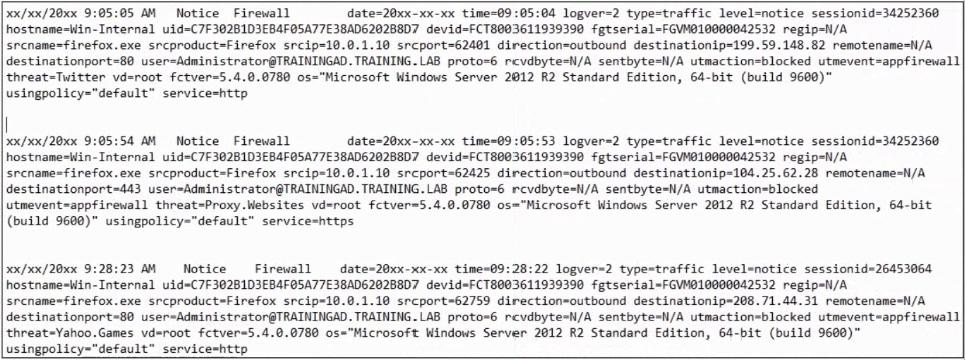
Based on the FortiClient logs shown in the exhibit which application is blocked by the application firewall?
Based on the FortiClient logs shown in the exhibit:
The first log entry shows the application 'firefox.exe' trying to access a destination IP, with the threat identified as 'Twitter.'
The action taken by the application firewall is 'blocked' with the event type 'appfirewall.'
This indicates that the application firewall has blocked access to Twitter.
Reference
FortiClient EMS 7.2 Study Guide, Application Firewall Logs Section
Fortinet Documentation on Interpreting FortiClient Logs
Refer to the exhibit.
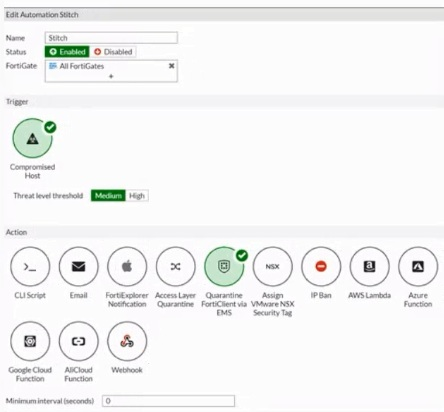
Based on the Security Fabric automation settings, what action will be taken on compromised endpoints?
Based on the Security Fabric automation settings shown in the exhibit:
The automation stitch is configured with a trigger for a 'Compromised Host.'
The action specified for this trigger is 'Quarantine FortiClient via EMS.'
This indicates that when an endpoint is detected as compromised, FortiClient EMS will quarantine the endpoint as part of the automation process.
Therefore, the action taken on compromised endpoints will be to quarantine them through EMS.
Reference
FortiGate Security 7.2 Study Guide, Automation Stitches and Actions Section
Fortinet Documentation on Configuring Automation Stitches and Quarantine Actions
Which two statements are true about ZTNA? {Choose two.)
ZTNA (Zero Trust Network Access) is a security architecture that is designed to provide secure access to network resources for users, devices, and applications. It is based on the principle of 'never trust, always verify,' which means that all access to network resources is subject to strict verification and authentication.
Two functions of ZTNA are:
ZTNA provides a security posture check: ZTNA checks the security posture of devices and users that are attempting to access network resources. This can include checks on the device's software and hardware configurations, security settings, and the presence of malware.
ZTNA provides role-based access: ZTNA controls access to network resources based on the role of the user or device. Users and devices are granted access to only those resources that are necessary for their role, and all other access is denied. This helps to prevent unauthorized access and minimize the risk of data breaches.
Get access to all 68 verified questions with detailed answers.
Unlock All FCP_FCT_AD-7.4 Questions