FCP_FML_AD-7.4 Exam Questions & Answers
FCP - FortiMail 7.4 Administrator • Fortinet
100% money-back guarantee
About FCP_FML_AD-7.4 Exam
The FCP_FML_AD-7.4 (FCP - FortiMail 7.4 Administrator) certification exam by Fortinet validates your expertise in deploying, configuring, and managing FortiMail email security solutions. This comprehensive certification covers critical topics including FortiMail architecture, email security policies, threat protection, quarantine management, user authentication, and advanced filtering techniques. Professionals responsible for email infrastructure security, system administrators, network security engineers, and IT professionals seeking to enhance their credentials should pursue this certification. The exam tests your ability to implement robust email security strategies that protect organizations from spam, malware, phishing, and data loss threats while maintaining email deliverability and user productivity.
To effectively prepare for the FCP_FML_AD-7.4 exam, candidates benefit significantly from updated exam dumps and practice tests that mirror the actual certification assessment. High-quality study materials provide hands-on scenarios, real-world configuration challenges, and detailed explanations of FortiMail features and best practices. Practice tests help identify knowledge gaps, build confidence, and improve time management during the actual exam. By combining official Fortinet documentation with comprehensive exam dumps and regular practice testing, candidates can thoroughly master FortiMail 7.4 administration and successfully demonstrate their competency in email security management to employers and industry peers.
Exam Topics & Objectives
4-Week Study Plan for FCP_FML_AD-7.4
Week 1: Initial Deployment and Basic Configuration Foundations
- Review FortiMail 7.4 system requirements and supported platforms
- Study hardware deployment options (physical appliances vs virtual machines)
- Complete initial setup wizard walkthrough including IP addressing and licensing
- Configure DNS settings and MX record pointing
- Set up administrator accounts with appropriate roles and permissions
- Review system interface navigation (web console and CLI)
- Study backup and restore procedures for configuration
- Configure time zone, NTP synchronization, and system clock settings
Week 2: Email Flow, Authentication, and Server Mode Configuration
- Understand FortiMail message flow architecture and routing logic
- Study SMTP protocol fundamentals and relay configuration
- Configure inbound and outbound mail policies
- Set up authentication methods (SASL, NTLM, Kerberos)
- Configure LDAP and Active Directory integration for user validation
- Study server mode operation with multiple mail servers
- Configure failover and load balancing in server mode
- Practice setting up relay hosts and smart hosts
- Review transport layer security (TLS/SSL) certificate configuration
Week 3: Email Security, Encryption, and Transparent Mode
- Configure content filtering and spam detection settings
- Study antivirus and antimalware engine integration
- Set up DLP (Data Loss Prevention) rules and policies
- Configure encryption methods (S/MIME and PGP)
- Study certificate management and key storage
- Review transparent mode deployment and WCCP configuration
- Configure transparent mode routing and policy enforcement
- Practice setting up FortiGuard subscription updates for threat protection
- Study outbreak protection and advanced threat detection
Week 4: Advanced Configuration, Security Policies, and Exam Preparation
- Configure advanced email security policies combining all previous topics
- Study recipient verification and address validation
- Set up quarantine management and user notification settings
- Review logging, monitoring, and reporting features
- Configure mail flow troubleshooting tools and diagnostics
- Practice switching between server mode and transparent mode configurations
- Review high availability and clustering setup for FortiMail
- Complete practice exam questions covering all five exam topics
- Review and remediate weak areas identified in practice tests
- Study real-world scenario-based questions and troubleshooting cases
Sample FCP_FML_AD-7.4 Questions
Practice with real exam-style questions. Reveal answers to verify your knowledge.
Refer to the exhibits, which display a topology diagram (Topology) and two FortiMail device configurations (FML1 Configuration and FML2 Configuration).
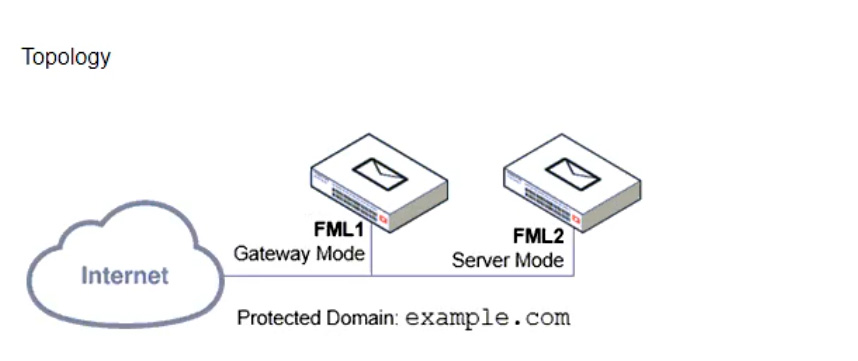
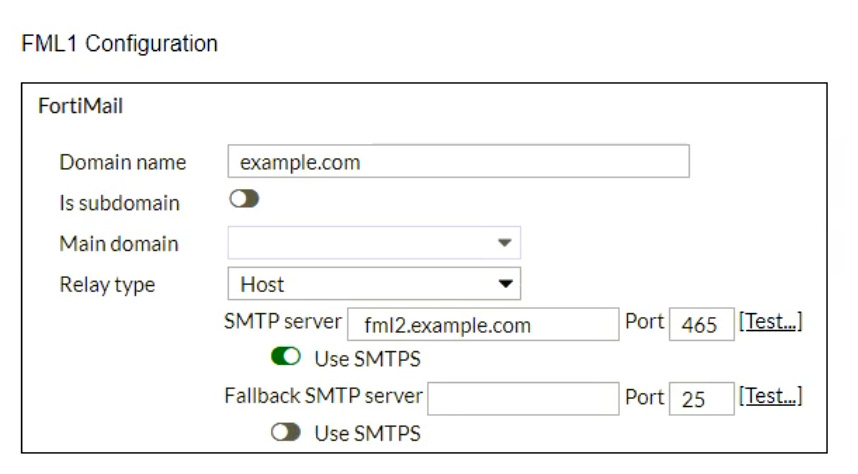
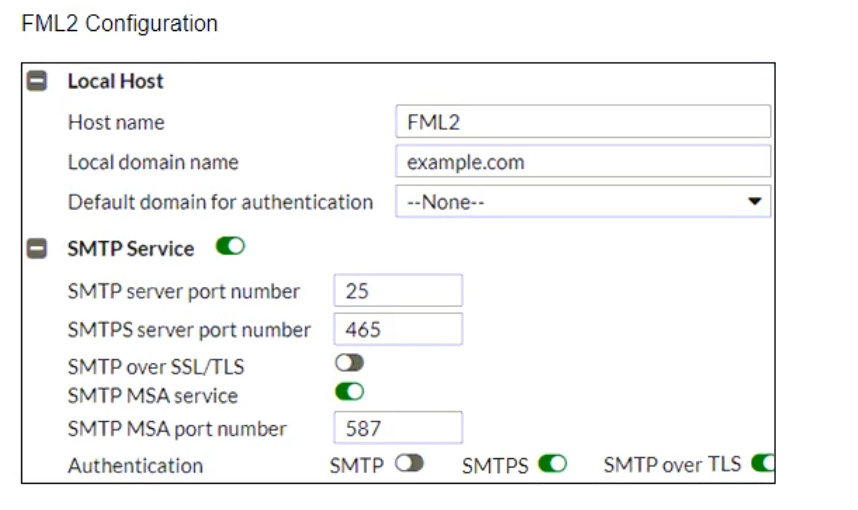
What is the expected outcome of SMTP sessions sourced from FML1 and destined for FML2?
Refer to the exhibit, which shows a partial antispam profile configuration.
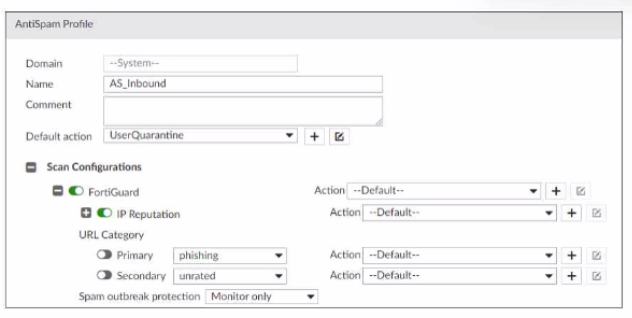
What will happen to an email that triggers Spam outbreak protection?
Refer to the exhibit, which shows the output of an email transmission using a telnet session.
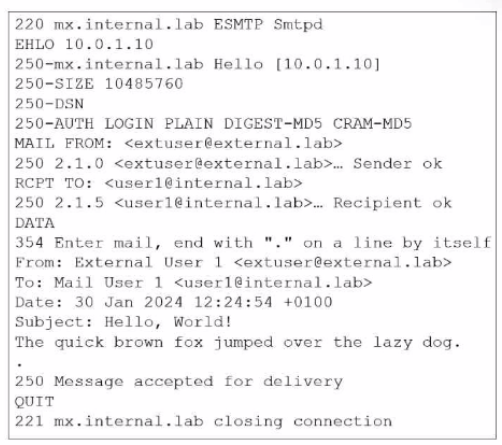
What are two correct observations about this SMTP session? (Choose two.)
Refer to the exhibit, which displays an encryption profile configuration.
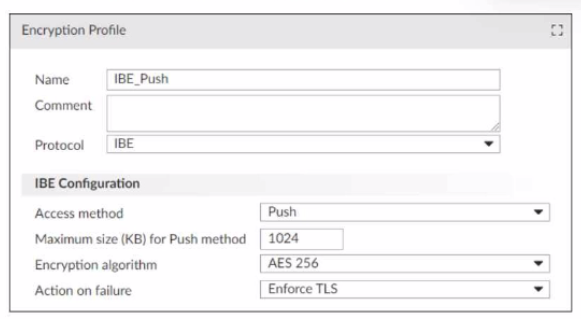
What happens if the attachment size of an IBE email exceeds 1024 KB?
Refer to the exhibits showing SMTP limits (Session Profile --- SMTP Limits), and domain settings (Domain Settings, and Domain Settings --- Other) of a FortiMail device.
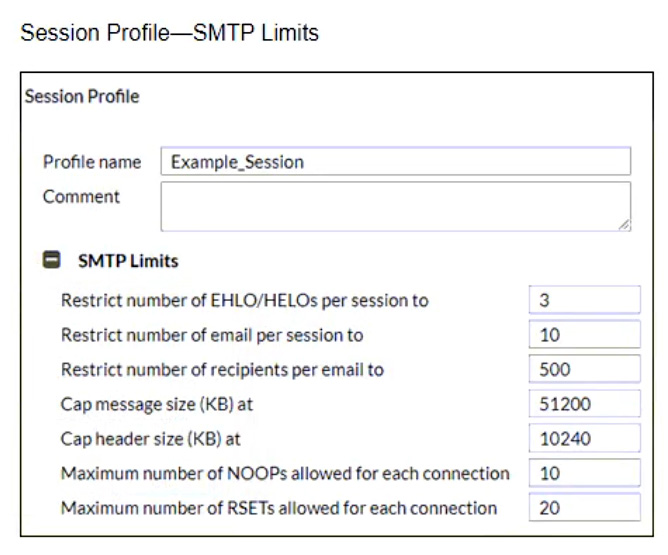
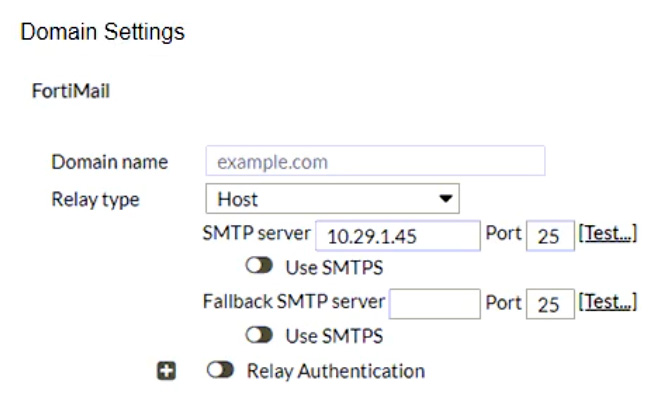
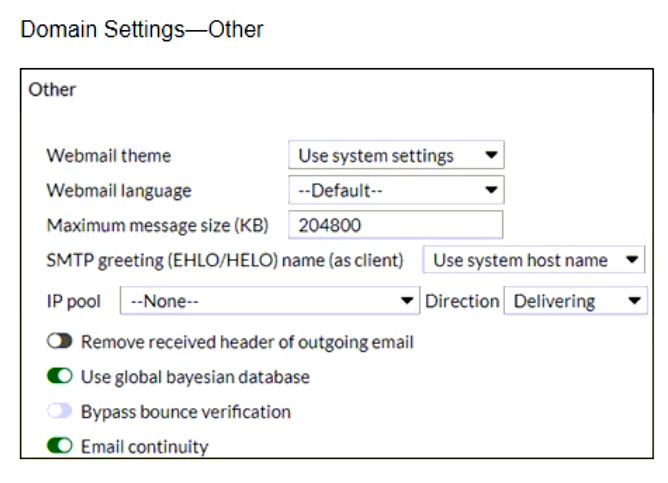
Which message size limit in KB will the FortiMail apply to outbound email?
Get access to all 53 verified questions with detailed answers.
Unlock All FCP_FML_AD-7.4 Questions