NSE5_SSE_AD-7.6 Exam Questions & Answers
Fortinet NSE 5 - FortiSASE and SD-WAN 7.6 Core Administrator • Fortinet
100% money-back guarantee
Sample NSE5_SSE_AD-7.6 Questions
Practice with real exam-style questions, each with the verified correct answer and explanation.
Which statement is true about FortiSASE supported deployment?
According to the FortiSASE 7.6 Administration Guide and the FCP - FortiSASE 24/25 Administrator curriculum, FortiSASE is designed with a hybrid deployment architecture to support various user and device requirements. It primarily operates in two modes:
Endpoint Mode (Agent-based): This mode requires the installation of FortiClient on the user's laptop or device. The agent establishes an 'always-up' secure VPN tunnel to the nearest FortiSASE Point of Presence (PoP), providing full Secure Internet Access (SIA), Secure Private Access (SPA), and endpoint posture checks (ZTNA).
Secure Web Gateway (SWG) Mode (Agentless): This mode is used for users or devices where installing an agent is not feasible (e.g., unmanaged devices or Chromebooks). It relies on explicit web proxy settings or a PAC (Proxy Auto-Configuration) file to redirect web traffic (HTTP/HTTPS) to the SASE PoP for inspection.
Why other options are incorrect:
Option A: While it supports VPN, 'VPN mode' is not the formal name of the deployment type; it is 'Endpoint mode'.
Option C: FortiSASE is not limited to SWG; it is a full SSE (Security Service Edge) solution including FWaaS and ZTNA.
Option D: ZTNA is a capability within the platform, not a replacement for the overall endpoint or SWG functions.
The IT team is wondering whether they will need to continue using MDM tools for future FortiClient upgrades.
What options are available for handling future FortiClient upgrades?
According to the FortiSASE 7.6 Feature Administration Guide and the latest updates to the NSE 5 SASE curriculum, FortiSASE has introduced native lifecycle management for FortiClient agents to reduce the operational burden on IT teams who previously relied solely on third-party MDM (Mobile Device Management) or GPO (Group Policy Objects) for every update.
The Endpoint Upgrade feature, found under System > Endpoint Upgrade in the FortiSASE portal, allows administrators to perform the following:
Centralized Version Control: Administrators can see which versions are currently deployed and which 'Recommended' versions are available from FortiGuard.
Scheduled Rollouts: You can choose to upgrade all endpoints or specific endpoint groups at a designated time, ensuring that upgrades do not disrupt business operations.
Status Monitoring: The portal provides a real-time dashboard showing the progress of the upgrade (e.g., Downloading, Installing, Reboot Pending, or Success).
Manual vs. Managed: While MDM is still highly recommended for the initial onboarding (the first time FortiClient is installed and connected to the SASE cloud), all subsequent upgrades can be handled natively by the FortiSASE portal.
Why other options are incorrect:
Option B: Manual upgrades are inefficient for large-scale deployments (~400 users in this scenario) and are not the intended 'feature-rich' solution provided by FortiSASE.
Option C: 'Onboarding' refers to the initial setup. Re-onboarding every time a version changes would be redundant and counterproductive.
Option D: While the system can manage the upgrade, it is not 'auto-upgraded on demand' by the client itself without administrative configuration in the portal. The administrator must still define the target version and schedule.
Refer to the exhibit.
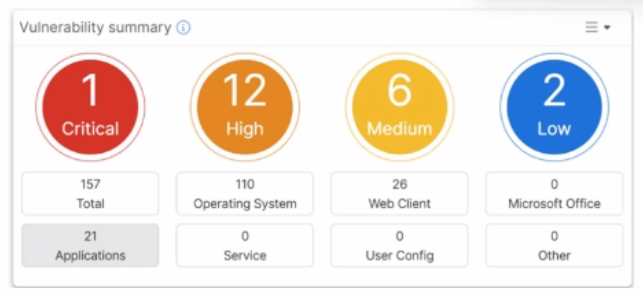
Which two statements about the Vulnerability summary dashboard in FortiSASE are correct? (Choose two.)
Based on the FortiSASE 7.6 (and later 2025 versions) curriculum and administration guides, the Vulnerability summary dashboard is a key component of the endpoint security posture management.
Drill Down Capability (Option C): According to the FortiSASE Administration Guide, the Vulnerability summary widget on the Security dashboard is interactive. An administrator can click on specific risk categories (e.g., Critical, High) or application types (e.g., Operating System, Web Client) to drill down. This action opens a detailed pane showing the specific affected endpoints, associated CVE identifiers, and severity classifications based on the CVSS standard.
Automatic Vulnerability Patching (Option D): In the FortiSASE 7.6/2025 feature sets, the endpoint profile configuration (under Endpoint > Configuration > Profiles) includes an 'Automatic Patching' section. This feature allows the system to automatically install security updates for supported third-party applications and the underlying operating system (Windows/macOS) when vulnerabilities are detected. Furthermore, administrators can schedule these patches directly from the Vulnerability Summary widget by selecting specific vulnerabilities.
Why other options are incorrect:
Option A: The dashboard categories (Operating System, Web Client, Microsoft Office, etc.) are based on known software signatures. While there is an 'Other' category, the dashboard primarily provides scores for recognized applications where CVE data is available.
Option B: The exhibit shows active data (157 total vulnerabilities), which indicates that the vulnerability scan is enabled and currently reporting data from the endpoints. If it were disabled, the widget would be empty or show zeros.
Which two delivery methods are used for installing FortiClient on a user's laptop? (Choose two.)
The FortiSASE 7.6 Administration Guide outlines the standard onboarding procedures for deploying the FortiClient agent to remote endpoints. There are two primary user-facing delivery methods:
Download from the FortiSASE portal (Option B): Administrators can provide users with access to the FortiSASE portal where they can directly download a pre-configured installer. This installer is uniquely tied to the organization's SASE instance, ensuring the client automatically registers to the correct cloud EMS upon installation.
Invitation Email (Option C): This is the most common administrative method. The FortiSASE portal (via its integrated EMS) allows administrators to send an invitation email to specific users or groups. This email contains direct download links for various operating systems (Windows, macOS, Linux) and the necessary invitation code for zero-touch registration.
Why other options are incorrect:
Option A: While third-party stores (like the App Store or Google Play) are used for mobile devices, 'zero-touch installation through a third-party store' is not the standard curriculum-defined method for laptops (Windows/macOS) in a SASE environment.
Option D: FortiSASE does not use a direct 'API to the user's laptop' for automatic installation. While MDM/GPO (centralized deployment) is supported, it is not described as an API-based auto-installation in the core curriculum.
Which two statements about configuring a steering bypass destination in FortiSASE are correct? (Choose two.)
According to the FortiSASE 7.6 Feature Administration Guide, steering bypass destinations (also known as split tunneling) allow administrators to optimize bandwidth by redirecting specific trusted traffic away from the SASE tunnel to the endpoint's local physical interface.
Destination Types (Option C): When creating a bypass destination, administrators can select from four distinct types: Infrastructure (pre-defined apps like Zoom/O365), FQDN (specific domains), Local Application (identifying processes on the laptop), or Subnet (specific IP ranges).
Apply Condition (Option B): The 'Apply' condition is a flexible setting that allows the administrator to choose when the bypass is active. It can be applied to endpoints that are On-net (inside the office), Off-net (remote), or Both. This ensures that if a user is in the office, they don't use the SASE tunnel for local resources, but if they are home, they might still bypass high-bandwidth sites like YouTube to preserve tunnel capacity.
Why other options are incorrect:
Option A: Subnet is one of four types and is not the only type supporting these conditions.
Option D: The system explicitly supports 'Both' to ensure consistency across network transitions.
Get access to all 50 verified questions with detailed answers.
Unlock All NSE5_SSE_AD-7.6 Questions