NSE5_FSW_AD-7.6 Exam Questions & Answers
Fortinet NSE 5 - FortiSwitch 7.6 Administrator • Fortinet
100% money-back guarantee
Sample NSE5_FSW_AD-7.6 Questions
Practice with real exam-style questions, each with the verified correct answer and explanation.
Refer to the exhibit.
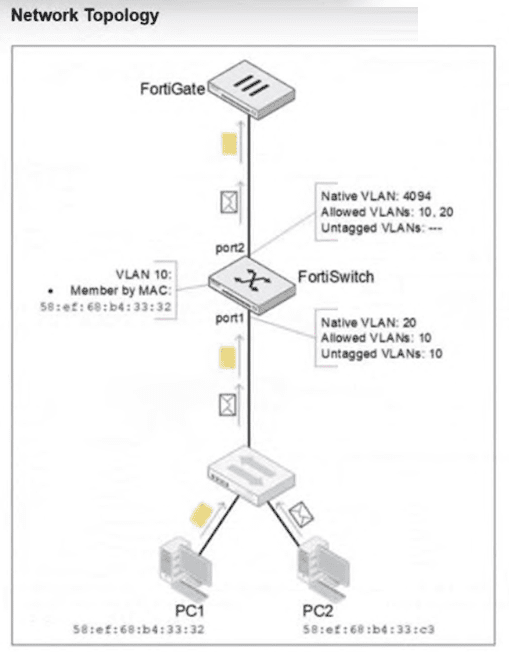
PC1 and PC2 are connected to port1 on FortiSwitch. Which VLAN tags will FortiSwitch apply when forwarding PC1 and PC2 traffic out of port2? (Choose one answer)
According to theFortiSwitchOS 7.6 Administration Guideand theFortiSwitch 7.6 Study Guide, the classification of untagged traffic entering a switch port is determined by the port's hierarchy of VLAN assignment rules.
For the traffic arriving atport1:
PC1 (MAC 58:ef:68:b4:33:32):The exhibit shows an explicitMAC-based VLAN assignmentrule for this specific MAC address, placing it intoVLAN 10. In FortiSwitchOS, dynamic assignments like MAC-based or protocol-based rules take precedence over the port's static native VLAN. Therefore, PC1's traffic is internally associated with VLAN 10.
PC2 (MAC 58:ef:68:b4:33:c3):There is no MAC-based rule for this device. As a result, the switch falls back to the default behavior and assigns the traffic to the port'sNative VLAN, which isVLAN 20.
For the traffic exiting port2:
The egress behavior depends on the VLAN tagging configuration of the outgoing interface. On port2, the Native VLAN is 4094, and VLANs 10 and 20 are listed as Allowed VLANs. According to Fortinet documentation, any traffic belonging to an allowed VLAN that does not match the native VLAN ID of the egress port must be sent as tagged 802.1Q frames. Since neither VLAN 10 nor VLAN 20 matches the native ID of 4094, the FortiSwitch will apply a VLAN 10 tag to PC1's traffic and a VLAN 20 tag to PC2's traffic as they are forwarded to the FortiGate.
Which three are valid actions that a FortiSwitch access control list (ACL) can apply to matching traffic? (Choose three answers)
According to theFortiSwitchOS 7.6 Administration Guideand theNSE 5 FortiSwitch 7.6 Administrator Study Guide, Access Control Lists (ACLs) are used to perform multiple actions on matching traffic as it passes through the switch pipeline. The documentation explicitly categorizes these valid actions into three distinct functional groups:Traffic processing,QoS (Quality of Service), andVLANmodifications.
Traffic Processing (Option C):This is a primary category of ACL actions. It includes operations that dictate how a frame is physically handled or monitored. Valid specific actions under this category includedrop(discarding the packet),count(incrementing a packet counter for statistics),redirect(sending the packet to a specific interface or CPU queue), andmirror(copying the traffic to a monitor port).
QoS (Option E):The QoS category allows the switch to manage traffic prioritization and bandwidth. ACLs can be configured toset the egress queue(assigning a frame to one of the eight priority queues),remark CoS (Class of Service)orDSCP (Differentiated Services Code Point)values in the frame header, and applypolicersfor rate limiting.
VLAN / Set outer VLAN tags (Option D):Under the VLAN category, the most notable action is the ability toset outer VLAN tagson frames. This is particularly useful in scenarios involving Q-in-Q tunneling or service provider environments where a secondary tag is required for transport across a managed fabric.
It is important to note thatAssign the VLAN ID (Option A)is typically a function ofNAC (Network Access Control)orDynamic VLAN Assignmentrather than a standard ACL action; within an ACL context, vlan-id is primarily used as aclassifier(to match traffic) rather than an action.Quarantine devices (Option B)is a high-level security response triggered by the FortiGate NAC engine and is not a direct action available within the FortiSwitch ACL configuration menu.
Which statement about using MAC, IP, and protocol-based VLANs on FortiSwitch is true?
It provides benefits that can be obtained when using 802.1X authentication (C): MAC, IP, and protocol-based VLANs on FortiSwitch are beneficial in network environments where additional granularity is needed in traffic segmentation and security, similar to what can be achieved through 802.1X authentication. These VLAN types allow for dynamic assignment of ports to VLANs based on the characteristics of the incoming traffic, enhancing both security and network efficiency.
Refer to the exhibit.
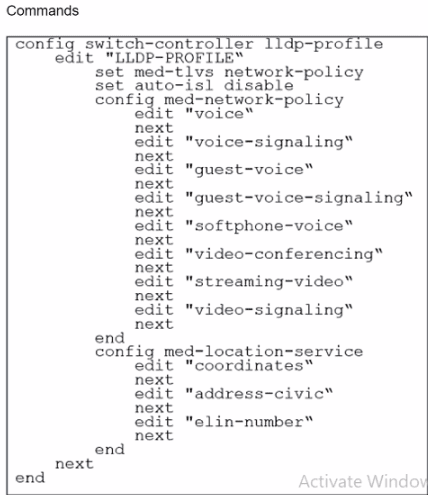
The profile shown in the exhibit is assigned to a group of managed FortiSwitch ports, and these ports are connected to endpoints which are powered by PoE.
Which configuration action can you perform on the LLDP profile to cause these endpoints to exchange PoE information and negotiate power with the managed FortiSwitch?
To cause endpoints to exchange PoE information and negotiate power with the managed FortiSwitch via LLDP, you should configure the LLDP profile to include power management in the advertised LLDP-MED TLVs. Here are the steps:
Access the LLDP Profile Configuration:Start by entering the LLDP profile configuration mode with the command:
config switch-controller lldp-profile
edit 'LLDP-PROFILE'
Enable MED-TLVs:Ensure that MED-TLVs (Media Endpoint Discovery TLVs) are enabled. These TLVs are used for extended discovery relating to network policies, including PoE, and are essential for PoE negotiation. They include power management which is crucial for the negotiation of PoE parameters between devices. The command to ensure network policies are set might look like:
set med-tlvs network-policy
Add Power Management TLV:Specifically add or ensure the power management TLV is part of the configuration. This will advertise the PoE capabilities and requirements, enabling dynamic power allocation between the FortiSwitch and the connected devices (like VoIP phones or wireless access points). This can typically be done within the network-policy settings:
config med-network-policy
edit
set poe-capability
next
end
Save and Apply Changes:Exit the configuration blocks properly ensuring changes are saved:
End
Verify Configuration:It's always good practice to verify that your configurations have been applied correctly. Use the appropriateshoworgetcommands to review the LLDP profile settings.
By adding the power management as part of LLDP-MED TLVs, the FortiSwitch will be able to communicate its power requirements and capabilities to the endpoints, thereby facilitating a dynamic power negotiation that is crucial for efficient PoE utilization.
Refer to the exhibit.
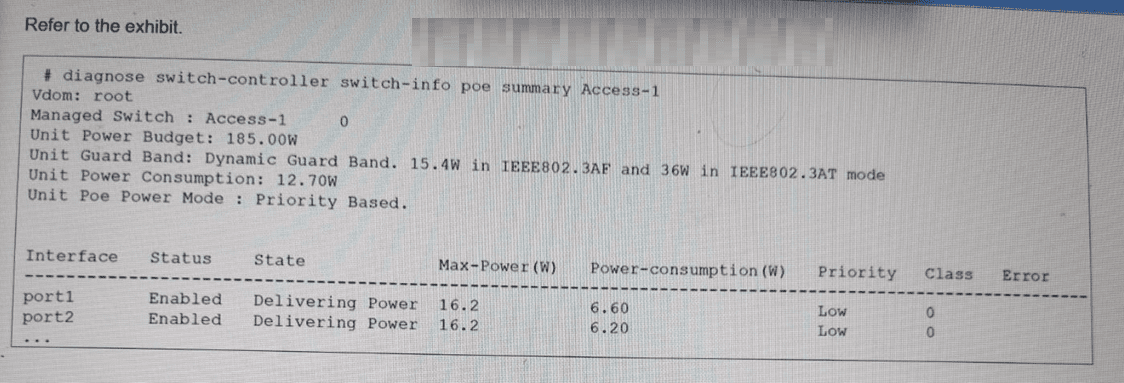
The FortiSwitch CLI output of the diagnose switch-controller switch-info poe summary command for the switch Access-1 is shown. It shows that two ports have Power over Ethernet (PoE) enabled and are already in use. What is the most important consideration if you want to connect additional PoE devices to FortiSwitch? (Choose one answer)
According to theFortiSwitchOS 7.6 Administration Guideand theFortiSwitch 7.6 Study Guide, the primary physical constraint when deploying PoE devices is the total power capacity of the switch's internal power supply unit (PSU). The provided exhibit shows the PoE status forAccess-1, highlighting three critical metrics: theUnit Power Budget (185.00W), the currentUnit Power Consumption (12.70W), and theUnit Guard Band.
TheUnit Power Budgetrepresents the maximum amount of power the switch can provide to all connected Powered Devices (PDs) simultaneously. As more devices (such as access points, VoIP phones, or cameras) are connected, the cumulative power draw increases. The most important consideration is ensuring that thetotal PoE consumption does not exceed this budget. If the budget is exceeded, the switch will stop providing power to new devices or, depending on the configuration, may shut down lower-priority ports to protect the system hardware.
In this specific exhibit, theUnit Poe Power Modeis set toPriority Based. This means that if the power consumption approaches the budget limit, the switch will use the configured port priorities (seen as 'Low' for port1 and port2) to decide which devices to keep powered. TheGuard Band(set to a dynamic value) also plays a role by reserving a small amount of power to handle spikes when devices initialize, further emphasizing that the power budget is a hard limit that must be actively managed by the administrator.
Get access to all 114 verified questions with detailed answers.
Unlock All NSE5_FSW_AD-7.6 Questions