FCP_FWB_AD-7.4 Exam Questions & Answers
FCP - FortiWeb 7.4 Administrator • Fortinet
100% money-back guarantee
Sample FCP_FWB_AD-7.4 Questions
Practice with real exam-style questions, each with the verified correct answer and explanation.
What are two results of enabling monitor mode on FortiWeb? (Choose two.)
It does not affect denial-of-service (DoS) protection profile actions to rate limit traffic: Monitor mode allows FortiWeb to monitor traffic without impacting the protection profile actions, including rate limiting in the DoS protection profiles. Traffic will still be subjected to DoS protection actions like rate limiting, but FortiWeb will not block traffic unless a violation occurs.
It overrides all usual profile actions. FortiWeb accepts all requests and generates alert email or log messages only for violations: In monitor mode, FortiWeb will allow all traffic through and generate logs or alerts for any violations, but it will not take active actions like blocking requests or redirecting traffic. This allows you to observe the traffic patterns and potential threats without disrupting normal operations.
Refer to the exhibit.
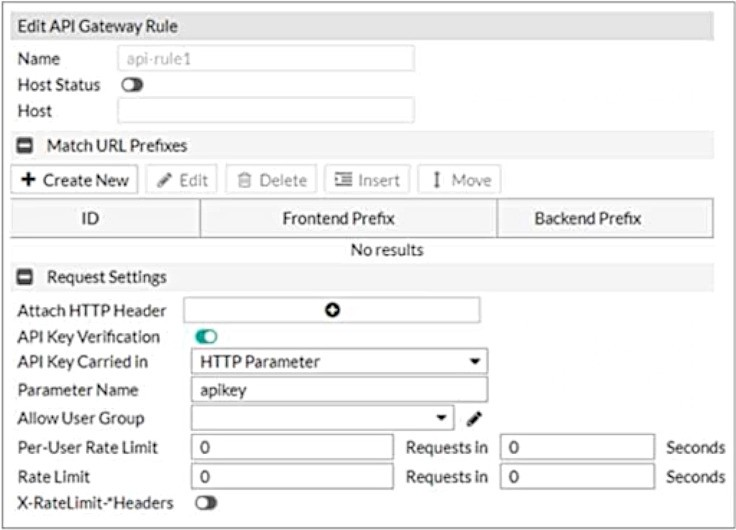
What are two additional configuration elements that you must be configure for this API gateway? (Choose two.)
When configuring an API Gateway on a FortiWeb appliance, it's essential to include specific elements to ensure proper functionality and security. Two critical configuration elements are:
Defining Rate Limits: Implementing rate limits is crucial to control the number of requests a client can make to the API within a specified timeframe. This helps prevent abuse, such as denial-of-service attacks, by limiting excessive requests from clients.
Defining URL Prefixes: Specifying URL prefixes allows the FortiWeb appliance to identify and manage API requests accurately. By defining these prefixes, the appliance can route and process API calls correctly, ensuring that only legitimate traffic reaches the backend services.
These configurations align with Fortinet's best practices for setting up an API Gateway policy. While the exact steps may vary depending on the FortiWeb firmware version, the general process involves navigating to the Web Application Firewall section, selecting the API Gateway Policy tab, and configuring the necessary parameters, including rate limits and URL prefixes.
Review the following configuration:
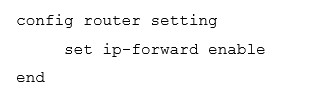
What are two routing behaviors that you can expect on FortiWeb after this configuration change? (Choose two.)
FortiWeb is primarily designed to handle HTTP and HTTPS traffic, protecting web applications from various threats. By default, when operating in reverse proxy mode, FortiWeb does not forward non-HTTP/HTTPS protocols to protected servers. However, administrators can configure FortiWeb to handle non-HTTP/HTTPS traffic differently using the config router setting command. This command allows enabling IP-based forwarding (routing) for non-HTTP/HTTPS traffic. When enabled, FortiWeb can route non-HTTP traffic through itself to the appropriate backend servers.
Despite this capability, any non-HTTP/HTTPS traffic that is destined directly for a FortiWeb virtual server IP address is dropped. This means that while FortiWeb can be configured to forward non-HTTP/HTTPS traffic to backend servers, it will not process non-HTTP/HTTPS traffic targeted at its own virtual server IPs.
Regarding IPv6 routing, FortiWeb does support IPv6 in various operation modes, including reverse proxy, offline inspection, and transparent inspection. However, enabling IPv6 routing requires specific configurations and is not automatically enabled by default.
Refer to the exhibit.
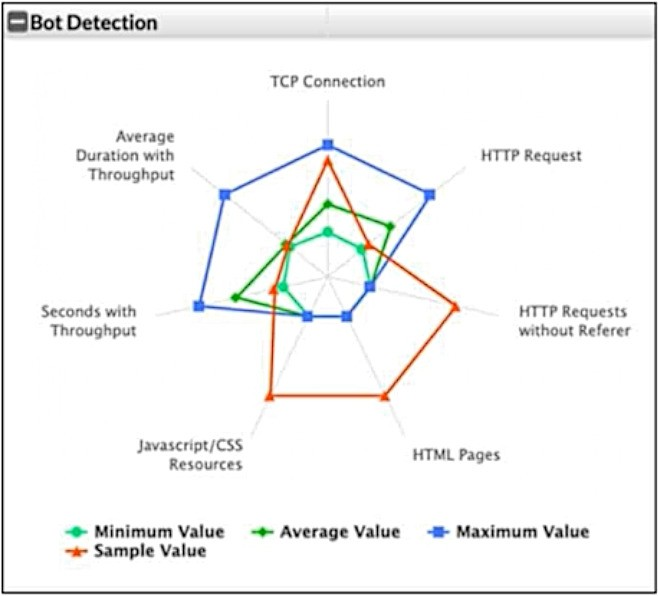
What can you conclude from this support vector machine (SVM) plot of a potential bot connection?
In the SVM plot of potential bot activity, you can see that the sample value (orange) is significantly different from the average value (green) and the maximum value (blue) in most of the metrics. This suggests unusual or abnormal behavior, indicating that the connection might be a bot. Typically, bots exhibit patterns that diverge from normal user activity, such as higher frequencies of certain types of requests, abnormal throughput, or an unusual pattern of HTTP requests (such as requests without referers or excessive TCP connections).
How are bot machine learning (ML) models different from API or anomaly detection models?
Bot ML models analyze multiple connections over time instead of analyzing each connection as a single unit: This is the key distinction. Bot ML models focus on analyzing patterns over a period of time, looking at behavioral patterns across multiple requests or connections from the same source to identify potential bot activity. Unlike traditional anomaly detection or API models that may focus on single connections or individual transactions, bot detection typically examines aggregated behavior to identify patterns indicative of bots, such as high-frequency requests or unusual traffic flows.
Get access to all 36 verified questions with detailed answers.
Unlock All FCP_FWB_AD-7.4 Questions