FCSS_EFW_AD-7.6 Exam Questions & Answers
FCSS - Enterprise Firewall 7.6 Administrator • Fortinet
100% money-back guarantee
Sample FCSS_EFW_AD-7.6 Questions
Practice with real exam-style questions, each with the verified correct answer and explanation.
Refer to the exhibit, which shows an enterprise network connected to an internet service provider.
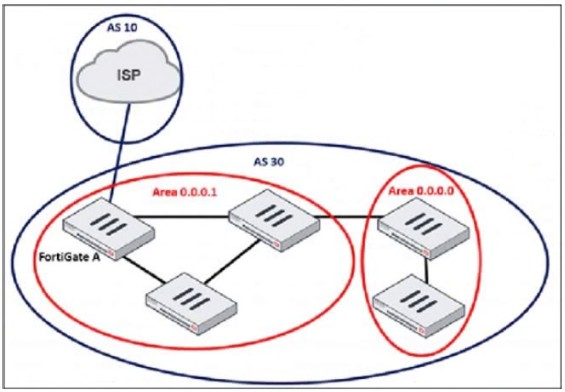
The administrator must configure the BGP section of FortiGate A to give internet access to the enterprise network.
Which command must the administrator use to establish a connection with the internet service provider?
In BGP (Border Gateway Protocol), a neighbor (peer) configuration is required to establish a connection between two BGP routers. Since FortiGate A is connecting to the ISP (Autonomous System 10) from AS 30, the administrator must define the ISP's BGP router as a neighbor.
The config neighbor command is used to:
Define the ISP's IP address as a BGP peer
Specify the remote AS (AS 10 in this case)
Allow BGP route exchanges between FortiGate A and the ISP
Which two statements about IKEv2 are true if an administrator decides to implement IKEv2 in the VPN topology? (Choose two.)
IKEv2 (Internet Key Exchange version 2) is an improvement over IKEv1, offering enhanced security, efficiency, and flexibility in VPN configurations.
It includes stronger Diffie-Hellman (DH) groups, such as Elliptic Curve (ECP) groups.
IKEv2 supports stronger cryptographic algorithms, including Elliptic Curve Diffie-Hellman (ECDH) groups such as ECP256 and ECP384, providing improved security compared to IKEv1.
It supports the extensible authentication protocol (EAP).
IKEv2 natively supports EAP authentication, which allows integration with external authentication mechanisms such as RADIUS, certificates, and smart cards. This is particularly useful for remote access VPNs where user authentication must be flexible and secure.
A company's guest internet policy, operating in proxy mode, blocks access to Artificial Intelligence Technology sites using FortiGuard. However, a guest user accessed a page in this category using port 8443.
Which configuration changes are required for FortiGate to analyze HTTPS traffic on nonstandard ports like 8443 when full SSL inspection is active in the guest policy?
When FortiGate is operating in proxy mode with full SSL inspection enabled, it inspects encrypted HTTPS traffic by default on port 443. However, some websites may use non-standard HTTPS ports (such as 8443), which FortiGate does not inspect unless explicitly configured.
To ensure that FortiGate inspects HTTPS traffic on port 8443, administrators must manually add port 8443 in the Protocol Port Mapping section of the SSL/SSH Inspection Profile. This allows FortiGate to treat HTTPS traffic on port 8443 the same as traffic on port 443, enabling proper inspection and enforcement of FortiGuard category-based web filtering.
Which action should you take after applying a block-all IPS profile that caused applications to stop working?
Refer to the exhibit.
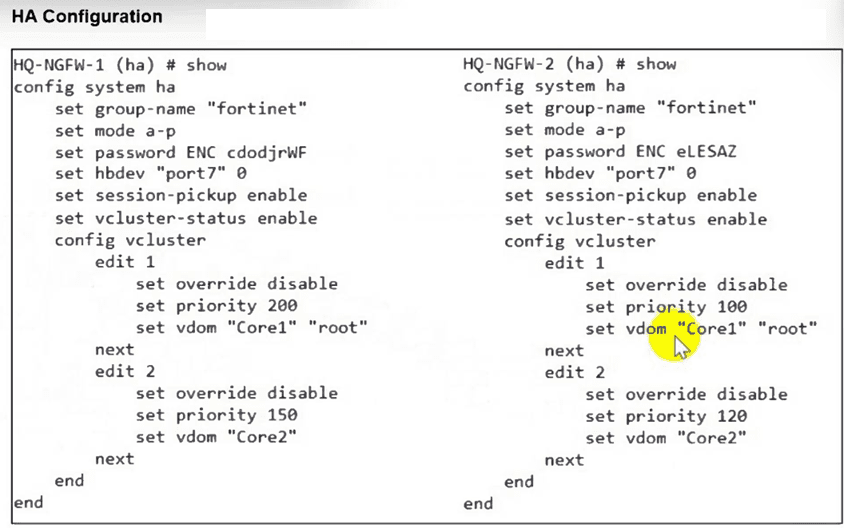
An HA configuration of an active-active (A-A) cluster with the same HA uptime is shown. You want HQ-NGFW-2 to handle the Core2 VDOM traffic. Which modification must you make to achieve this outcome? (Choose one answer)
Comprehensive and Detailed Explanation From Exact Extract of Enterprise Firewall 7.6 Administrator documents:
Based on the FortiOS 7.6 Administration Guide and the HA Virtual Clustering documentation, the exhibit demonstrates a Virtual Clustering environment where multiple VDOMs are distributed across an HA cluster.
In a virtual cluster setup, VDOMs are assigned to either virtual cluster 1 (vcluster 1) or virtual cluster 2 (vcluster 2). Each virtual cluster has its own independent primary unit selection process. The primary unit for a virtual cluster is determined based on the standard HA selection criteria: Monitored Interfaces > HA Uptime > Priority > Serial Number.
According to the exhibit:
Virtual Cluster 1 (edit 1) contains VDOMs 'Core1' and 'root'.
Virtual Cluster 2 (edit 2) contains VDOM 'Core2'.
The HA uptime is stated to be the same for both devices.
For edit 2 (Core2), HQ-NGFW-1 has a priority of 150, while HQ-NGFW-2 has a priority of 120.
In both units, override is disabled (default).
Since the uptime is equal and no monitored interfaces are down, the cluster uses the Priority value to select the primary unit for each vcluster. Currently, HQ-NGFW-1 is the primary for Core2 because its priority (150) is higher than HQ-NGFW-2's (120). To ensure HQ-NGFW-2 handles the Core2 traffic, its priority for virtual cluster 2 must be increased to a value higher than 150. Option C (changing the priority from 120 to 200) achieves this.
Get access to all 113 verified questions with detailed answers.
Unlock All FCSS_EFW_AD-7.6 Questions