FCSS_LED_AR-7.6 Exam Questions & Answers
Fortinet NSE 6 - LAN Edge 7.6 Architect • Fortinet
100% money-back guarantee
Sample FCSS_LED_AR-7.6 Questions
Practice with real exam-style questions, each with the verified correct answer and explanation.
Refer to the exhibits.
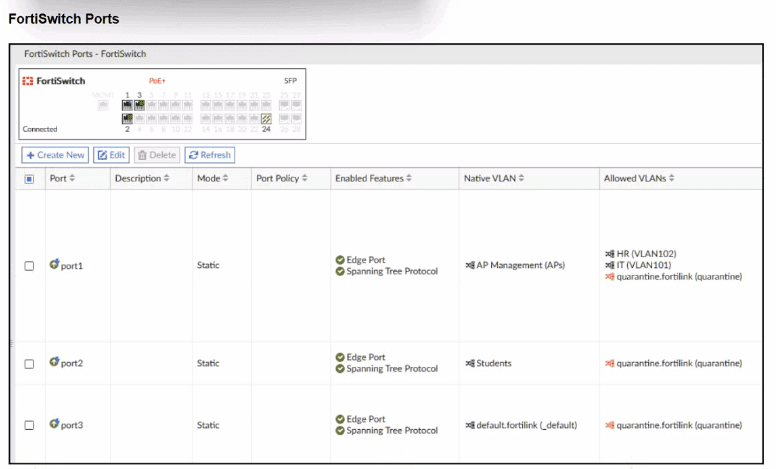
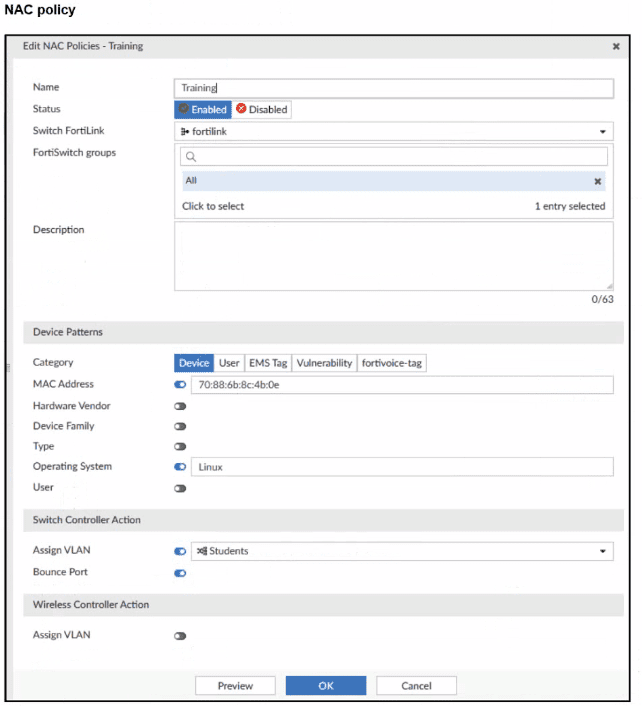
A NAC policy has been configured to apply traffic that flows through FortiSwitch port 2. Traffic that meets the NAC policy criteria will be assigned to the Students VLAN. However, the NAC policy does not seem to be taking effect.
Which configuration is missing?
From the exhibits:
FortiSwitch Ports viewshows:
port2
Mode: Static
Native VLAN: Students
Allowed VLANs: quarantine.fortilink (quarantine)
NAC policy ''Training'':
Switch FortiLink: fortilink
Category:Device
Matching criteria:
MAC Address: 70:88:6b:8c:4b:0e (enabled)
Operating System:Linux(enabled)
Switch Controller Action:
Assign VLAN = Students
Bounce Port = enabled
Design intent:
Device with that MAC + OS Linux, when plugged intoport2, should be dynamically moved to VLANStudentsby the NAC policy.
Why it doesn't work now
On FortiLink NAC,dynamic NAC decisions only apply on ports whose ''Access Mode'' is set to NAC:
NAC mode = FortiGate controls theonboarding VLAN, evaluates NAC policies, and then dynamically reassigns the switch port VLAN (access, quarantine, etc.).
Static mode(what we see on port2) means the port just uses its configurednative/allowed VLANs, andno NAC classificationhappens.
Right now:
port2 is astatic access portwith Native VLAN = Students.
The NAC policy exists, butFortiSwitch is not in NAC enforcement mode on that port, so the policy is never evaluated for traffic on port2.
Therefore, themissing configurationis:
Setport2toNAC mode(sometimes called ''Access mode: NAC'' or ''NAC LAN edge port'').
Once port2 is changed to NAC mode:
Device initially lands in the onboarding/quarantine VLAN.
FortiGate collects device info (MAC, OS, etc.).
NAC policy ''Training'' matches MAC + Linux.
Switch controller actionAssign VLAN = Studentsis applied.
Port is bounced (if configured), bringing the device back up in VLAN Students.
Why the other options are wrong
B . MAC or OS misconfigured
Possible in general, but the question asks forwhich configuration is missing, and the exhibits clearly focus on port mode. Also, even with wrong MAC/OS, the port would still be in NAC mode; here NAC isn't even active.
C . Port Policy mode
Port policy (edge/trunk) is separate from NAC; NAC requires the specificNAC access mode.
D . Students VLAN should be Allowed VLANs instead of Native VLAN
For an access port, having Students as thenative VLANis correct. NAC policy's Assign VLAN will set that as access VLAN; no need to make it an allowed trunk VLAN.
What is the primary function of FortiLink NAC in a LAN environment?
FortiLink NACis the NAC (Network Access Control) engine built into FortiGate when it manages FortiSwitch devices.
It performs:
Automated device onboarding
Automatically detects new devices connecting to switches.
Uses MAC, vendor, DHCP fingerprinting, or IoT database to classify devices.
No manual VLAN assignment required.
Security posture verification
Works with FortiClient EMS, ZTNA tags, IoT detection.
Applies policies based on:
Device type
User role
Endpoint compliance
IoT vulnerability status
Dynamic VLAN assignment
Automatically moves devices into proper VLANs, quarantine networks, or guest zones.
Integration with LAN Edge & Zero Trust
Uses FortiGate + FortiSwitch + FortiAP to enforce zero-trust access.
This matches the LAN Edge 7.6 Architect explanation of FortiLink NAC.
Why other answers are wrong
A . Extend security policies across FortiGate firewalls
Not NAC. That refers to Security Fabric or SD-WAN.
C . Apply manual firewall rules
FortiLink NAC is specifically designed toautomateaccess control.
D . Manually place devices in VLANs
NAC eliminates manual VLAN assignment --- it is dynamic.
Refer to the exhibits.
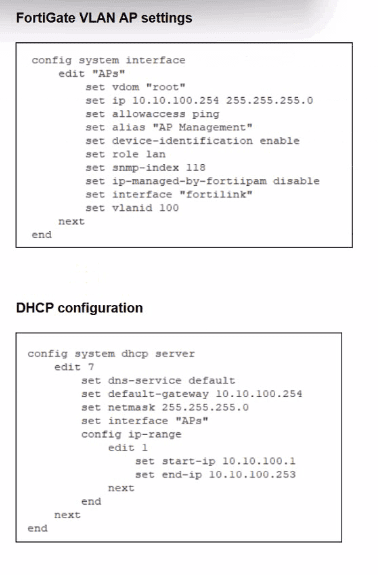
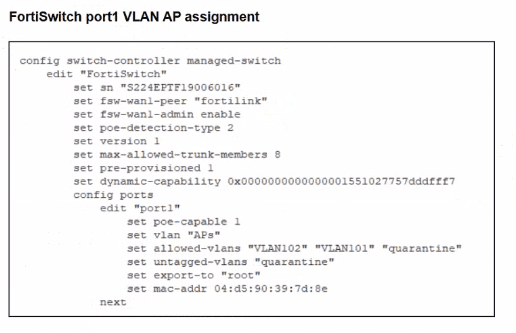
A FortiSwitch is successfully managed by a FortiGate. FortiAP is connected to port1 of the managed FortiSwitch. On FortiGate, the VLAN AP is configured to detect and manage FortiAP, along with a DHCP server for the VLAN AP. Additionally, the VLAN AP is assigned to port1 of FortiSwitch. However. FortiGate is unable to detect or manage FortiAP.
Which FortiGate misconfiguration is preventing the detection of FortiAP?
From the exhibits:
Interface''APs''is a VLAN sub-interface onfortilinkwith IP10.10.100.254/24and a DHCP server scope 10.10.100.1--10.10.100.253.
This VLAN is assigned toport1on the managed FortiSwitch for FortiAPs.
The interface config showsonly allowaccess ping---Security Fabric Connection is not enabled.
In LAN Edge designs, FortiAPs connected through FortiSwitch are discovered and managed asLAN edge devices of the Security Fabric. FortiOS documentation states that FortiAPs and FortiSwitches appear in the Fabric topologyonly when connected on an interface with Security Fabric Connection enabled.
If the VLAN/AP management interface lacksSecurity Fabric Connection:
FortiGate does not treat that network as aFabric connection segment.
CAPWAP discovery from FortiAPs on that VLAN will not result in the AP being onboarded and shown for management.
Therefore the key misconfiguration is:
A -- Security Fabric is disabled on the VLAN interface used for AP management.
Why the others are not the root cause:
B . Firmware incompatibility-- would usually show as a ''Managed (upgrade required)'' or similar status after discovery, not complete non-detection. The scenario specifically points to a configuration issue, not firmware.
C . VLAN not tagged correctly on uplink-- The FortiSwitch uplink to FortiGate is the FortiLink trunk, and the VLAN sub-interface APs is already bound to fortilink, so tagging on the uplink is correct by definition.
D . CAPWAP ports not open-- CAPWAP (UDP 5246/5247) is terminated locally on FortiGate and does not depend on any firewall policy; these ports are open on the FortiGate itself by default.
Refer to the exhibits.
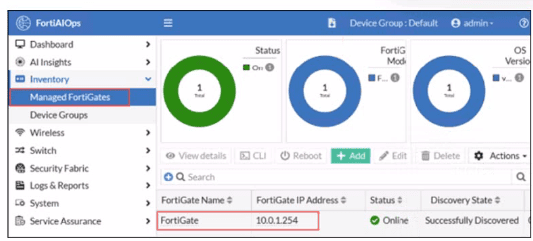
FortiGate has been added to FortiAIOps for management.
Which step must be performed on FortiAIOps to add a FortiSwitch device connected to the recently added FortiGate?
In a LAN Edge deployment:
FortiSwitch is managedthrough FortiGate via FortiLink.
FortiAIOps integrates withFortiGateas the single managed device; from there it gains visibility intoall Fabric and LAN-edge devices(FortiSwitch, FortiAP) that are registered to that FortiGate.
Once the FortiGate is successfully added to FortiAIOps (as shown in the exhibit, statusOnline / Successfully Discovered), all FortiSwitches managed by that FortiGate are:
Discovered automatically through the FortiGate--FortiAIOps connection
Shown under the appropriate inventory / switch views withno separate onboarding stepfor each switch.
This is why no extra IP, serial number, or credential entry is required for FortiSwitch.
So:
AandBsuggest manual per-switch onboarding, which is not how FortiAIOps works with LAN Edge.
Dsimilarly assumes direct FortiSwitch management, but FortiAIOps talks toFortiGate, not the switch.
Therefore the correct behavior is that theFortiSwitch is added automatically (C)once its managing FortiGate is connected to FortiAIOps.
In each user certificate, you can define the subject field, expiration date. User Principal Name (UPN), URL for CRL download, and the OCSP URL. How does the detailed configuration of these attributes impact the certificate?
In user certificates used with FortiGate / FortiAuthenticator / SSL-VPN / 802.1X, the following attributes are important:
Subject field & UPN
Provide a unique identity for the user (CN and/or UPN).
FortiGate can use theSAN/UPNfield for LDAP-integrated certificate authentication.
Expiration date
Limits how long the certificate is valid, enforcing lifecycle and rotation.
CRL URL & OCSP URL
Tell FortiGate (or any relying party)where to check if the certificate has been revoked.
Enablesnear real-time revocationusing OCSP or periodic CRL downloads instead of relying only on expiration.
By carefully configuring these fields:
The certificate uniquely and correctly identifies the user.
Relying systems can performaccurate and timely revocation checks, improving security.
Why other options are wrong:
A: It does the opposite---CRL/OCSP increase automation, not manual revocation.
B: These attributes do not inherently limit a cert to specific devices; that's done via key usage, EKU, or device certs.
D: They don't ''ensure universal validity''; they make the certprecisely boundto one identity with enforceable lifetime and revocation.
Get access to all 40 verified questions with detailed answers.
Unlock All FCSS_LED_AR-7.6 Questions